

Back-to-School, Solved: Use ChatGPT to Cut Costs, Calm Mornings and Dodge the Smartphone Fight
Photograph the supply list, make the AI show its math, and put the family schedule somewhere everyone can actually see it.

When I was growing up, back-to-school shopping meant the Sears catalog and a box of crayons with the built-in pencil sharpener. If we were really lucky, we got a scented eraser that kind of, sort of smelled like strawberries—or more like what strawberries might smell like if they grew in a rubber patch.
Now? The list includes laptops, apps, online accounts, family calendars and enough passwords to qualify as an AP course. The average family expects to spend nearly $600 per K–12 student this fall, and a good two-thirds of parents plan to hunt for sales and coupons.
That is where ChatGPT can earn a spot on the school-supply list. I have the paid Plus plan that runs $20 a month, but the free version or the Go plan ($8/month) works okay for this too.
Why ChatGPT specifically? It’s the one AI assistant that lets me tackle the entire back-to-school pileup—from shopping and family schedules to homework and school paperwork—in one place. Other popular AI models like Gemini, Claude, and Copilot can also handle many of these tasks one at a time, but ChatGPT bundled all of the photo uploads, voice conversations, and Temporary Chats for this particular test.
Safety First
Take 60 seconds to make ChatGPT more private before you hand it any personal documents.
Open Settings, choose Data Controls, and turn off “Improve the model for everyone.”
Use a Temporary Chat for family details; it stays out of your history and memory and is not used to train ChatGPT, although OpenAI may keep a copy for up to 30 days.
You should still remove names, addresses, ID numbers, account numbers, medical details, and anything else ChatGPT doesn’t need. No online service can promise zero risk, so the safest information is that stuff you never upload. OpenAI explains those controls here.
Once that’s done, it’s time to dig into a few genius AI life hacks and check out some of the gadgets it helped me find.
1. Price the whole list before you spend a dime:
Take a screenshot of the school-supply list. Open ChatGPT and paste this:
Here is my high school student’s [or elementary or college, etc] supply list. I am near ZIP code [ZIP]. Price it two ways: the lowest total across multiple stores and the lowest total from one nearby store offering pickup. Put every item in a table with prices and retailer links.
Snap a quick pic of whatever's left over from last year, because every family owns six glue sticks and five yellow highlighters, yet still buys more. Then upload that shot and ask ChatGPT to remove what you already have before it calculates the total.
OpenAI needs a few minutes to compare stores and build its answer. It was taking too long with the laptop on the list, so I took it out and ran it separately, which is now my go-to advice (see below). If you get an instant generic response, double-check that you selected it. Prices and inventory change quickly, and some retailers block automated access, so confirm both on the store’s site before you buy.
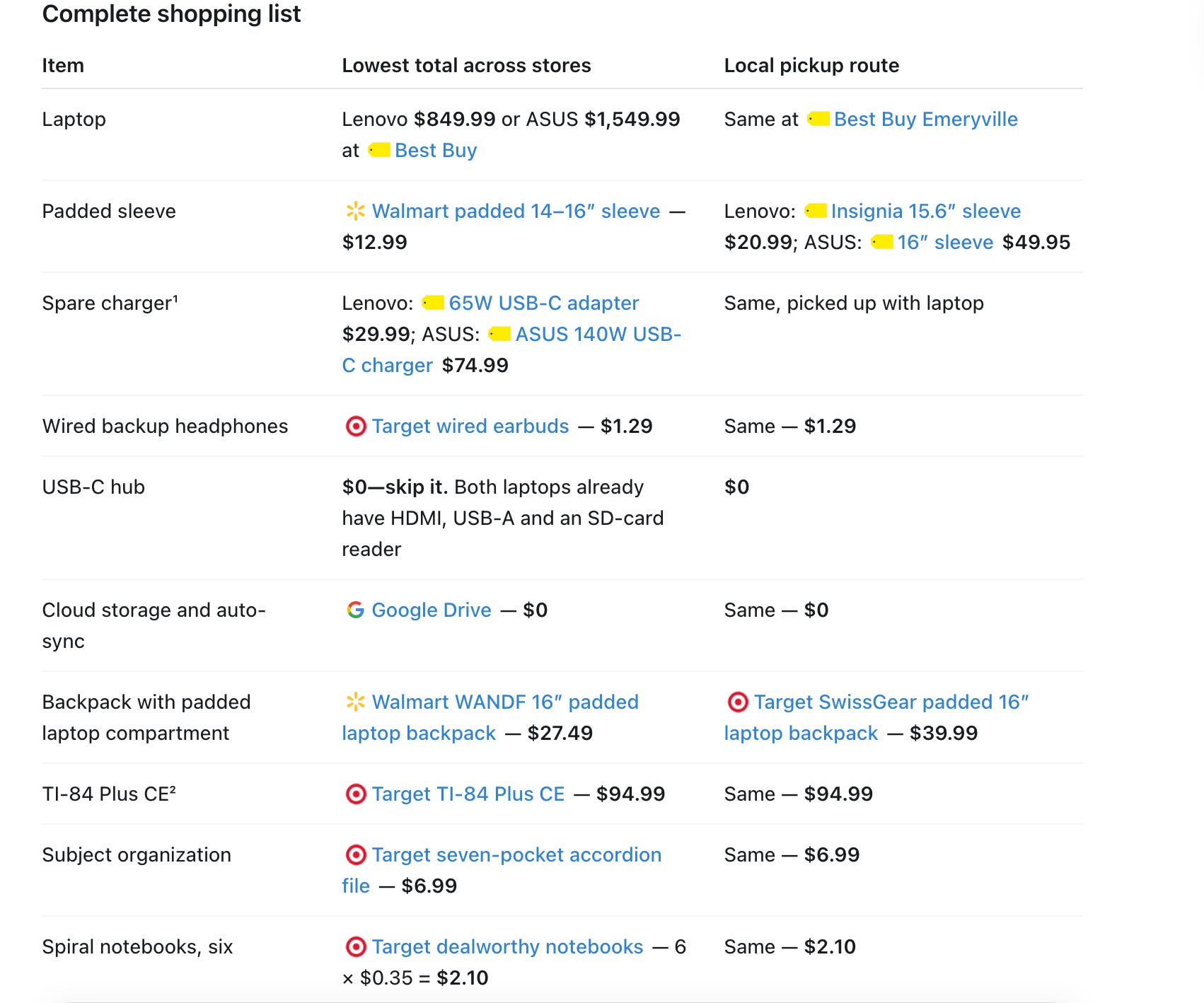
If the school hasn’t sent its back-to-school supply note yet, check TeacherLists.
The laptop deserves its own shopping plan:

One thing to do outside of that main list is the laptop. Most high schoolers and all college-age students are going to need their own device.
Shopping for one is different this year, though, because prices are skyrocketing. AI data centers are competing for some of the same memory and storage used in consumer computers. We’ve seen some popular laptops go up by $200 to $600 in one month, which makes comparison shopping more important than usual.
Two of the best laptops ChatGPT helped me uncover are from Lenovo and Asus, and so far they’re top picks in terms of value for the price:
The Lenovo IdeaPad Slim 3i was on sale for about $850 when I last checked. It has a 15.3-inch 2K touchscreen, 16GB of memory, 512GB of storage, and Intel’s new Core Series 3 processor. Lenovo says this line also passed MIL-STD-810H durability, which is the rough-and-tumble military-grade testing that proves it’s tough enough to outlive most teenagers’ backpacks.

The ASUS Zenbook A16 is another great pick that packs a 16-inch 3K OLED touchscreen, 48GB of memory, and 1TB of storage into a laptop that weighs less than three pounds — which is pretty amazing. It runs on a Snapdragon ARM processor, so check required programs, drivers, and accessories before buying. Most everyday Windows apps work, but Microsoft says specialized software and some hardware may still have compatibility limits on ARM-based PCs.
This one is more of the splurge at just under $1,550 right now, but it’s the last laptop you should ever have to buy a student, and others with similar features run nearly $1,000 more.
Check student discounts on both computers before you pay.
I’ll have more detailed reviews of these two specific laptops in my back-to-school buying guide, publishing by August 1st.
2. Build the phone runway before the fight starts.
Just about every child wants their own smartphone long before they’re ready for one. Outfitting kids with gadgets needs to happen in stages that progress and mature like they do. I’ve always called these “training wheel gadgets.” It’s good to have them because it teaches kids how to manage tech rather than binge on it the second they get out of your sight. But it’s all about striking a healthy balance.
Open ChatGPT’s voice mode with your child and say,
Our 9-year-old needs to reach us after school but does not need the whole internet. Ask us one question at a time, then build a step-by-step device plan with a review date
Let it interview everyone, then discuss the result (all via that voice mode) until it feels right and fits your family.
The plan might move from a home phone to a watch, then to a limited phone and eventually to a smartphone. That turns “no” into “not yet, and here is what comes next.”
Ask one final question:
What is the least-connected device that solves the problem?
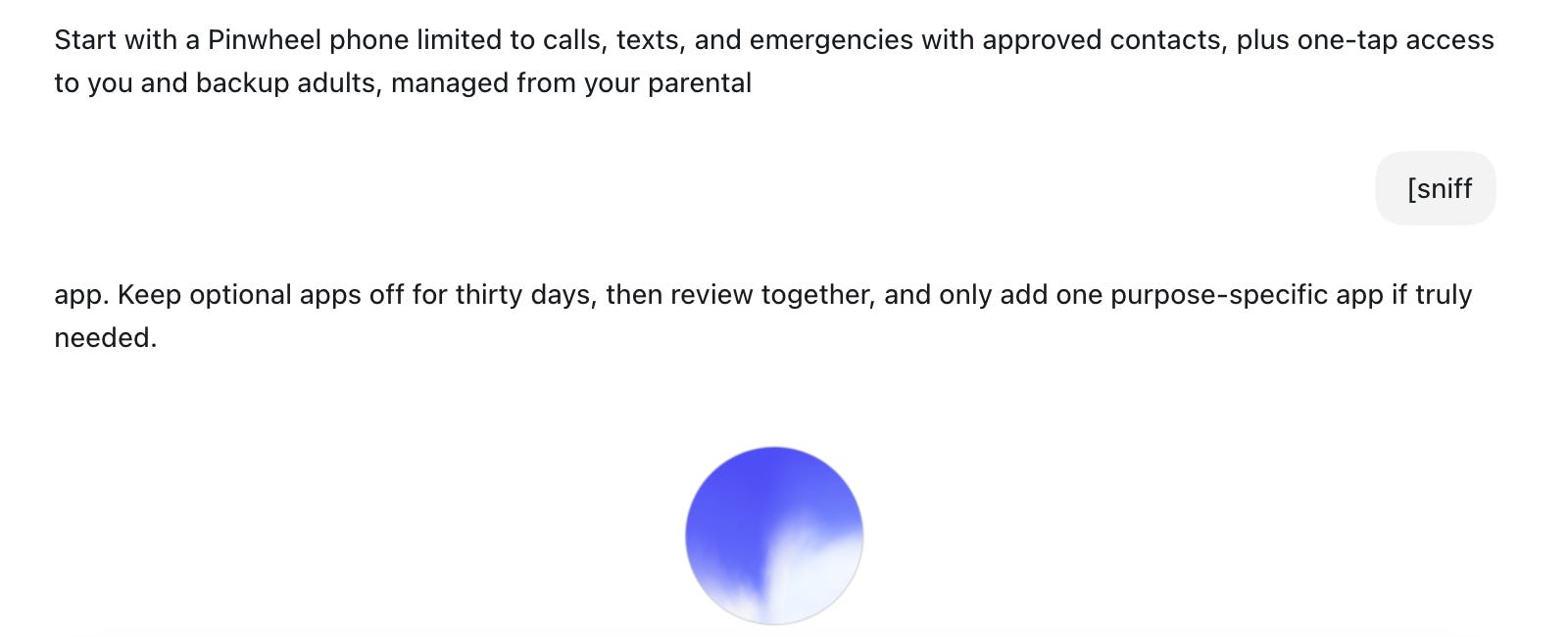
I steered it toward a landline phone because, after reviewing three of them quite extensively over the past few months, I think it’s the best way to break kids into healthy first tech use, without social media, YouTube, or other stuff that’s too mature for their budding brains. I highly recommend that as the place to start.

Pinwheel Home is the best landline phone I’ve reviewed yet for overall cost and how easy it is to set up (start to finish took less than ten minutes). The devices start at $68 and use Wi-Fi, so they don’t need a phone jack or an installer. Parents approve contacts and calling hours from an app on their phone. Unapproved numbers never ring through. Calls between Pinwheel devices and 911 access are included, but calls to regular numbers require a monthly plan. Those run just under $7 for calls to five regular phone numbers or just under $10 for unlimited calling.
I love hearing kids actually having conversations with each other, their grandparents, and their favorite aunt (that’s me, 🤣).
3. Talk through the schedule instead of typing it.
Open voice mode again and tell it the schedule you’re trying to figure out. Here’s what I just tried:
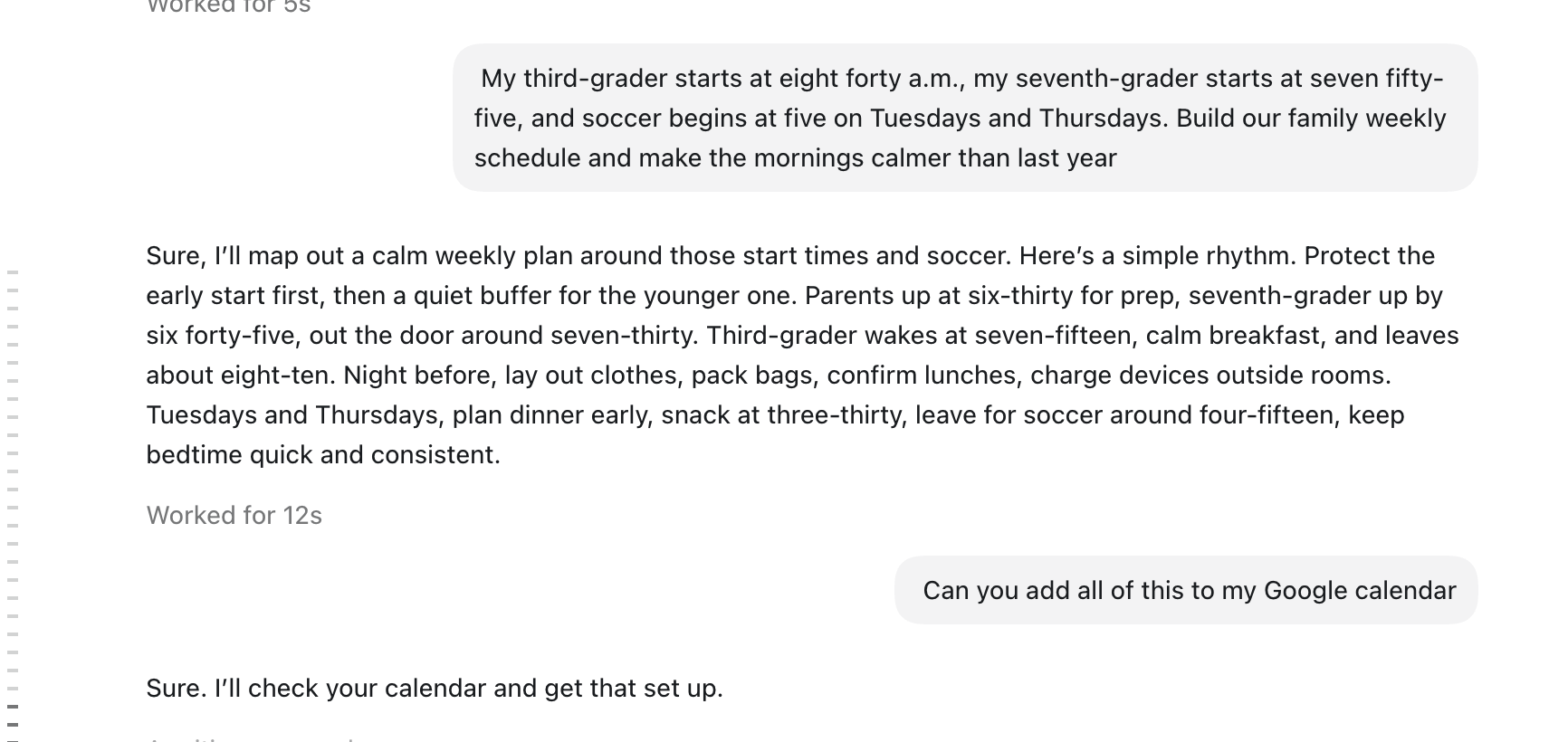
My third grader starts at 8:40, my seventh grader starts at 7:55, and soccer begins at 5 on Tuesday and Thursday. Build our weekly schedule and make the mornings calmer than last year.
Push back when the plan gets ridiculous. Tell it, “She is never waking up at 6:15,” and ask it to revise the schedule. It can share this new plan right to any calendars you connect with it, like Google or Outlook.
Then put the finished calendar where everyone can see it. I LOVE (yes, I’m shouting because I’m excited) this new Greenlight Family Hub that combines Google, Outlook, and iCloud calendars and includes chores, photos, and shared lists without a subscription. Greenlight charges almost $10 a month for optional AI voice and family location features. The hubs come in two different sizes; the 10.1-inch version is just under $200, while the 15.6-inch model is just under $300. Let this live right inside the front door, on the kitchen counter, or wherever you need one dedicated family screen that keeps your life super organized.

I have a bunch more of these “back to school ChatGPT hacks” that I’ll continue to share with you 1-3 at a time. I also have more great back-to-school gadget picks coming this Friday.
Stay tuned, tech+life is heating up again!
What’s your favorite tech-life hack?
My producer friend Suzanne told me this morning that she uses ChatGPT to buy watermelon, and it works super well. She snaps a photo of the choices at her local grocery store, and it literally tells her which one to pick. That’s super genius because we’ve bought three really bad ones in a row that we basically had to throw out.
What’s yours?
I checked all of these prices and features on July 27, 2026, but they may change. Retailer links may be affiliate links, but the reporting and recommendations remain independent.