

Stop sharing these things with AI, no matter what.
Plus 5 phone tricks from Today, the new Oura ring, and a sneak peek at Apple's giant Siri overhaul coming June 8th 👀

Happy Weekend!
I’m writing this from a little Jersey Shore town called Margate, looking out at a white sand beach and a few brave souls scattered on towels with legs paler than mine. After an action-packed week of work, meetings, and “how does anyone keep this pace up?” in Manhattan, I’m here with my husband and stepson, meeting some new family-adjacent folks who already feel like the real thing.
I hope the first sun-filled and relaxation-fueled hints of summer are hitting in all the right ways wherever you are, too. ☀️
We have lots of news to catch up on this week, including the full how-tos from my latest Today Show segment, the new Oura Ring, and the latest Apple WWDC leaks heading into June. (I’ll be in Cupertino covering it all on June 8th. Stay tuned!)
But first, let’s get into a few rules for using AI more safely. Seriously, nothing’s more important in your tech world than that right this second…
Stop sharing these things with AI, no matter what:

If you use a smartphone or any number of other daily tech tools, you use AI.
You use it every time you ask Siri to set a timer, or when Gmail finishes a sentence you’re typing. It’s also at the heart of when Instagram serves you a reel so specific you wonder if your phone is listening to your conversations. (It’s not. It’s just AI doing what it’s supposed to do: Know what you want before you want it.)
Even the people building and pushing AI don't fully understand where it’s all heading. That's the focus of this week's Techish podcast with tech-ethicist Tristan Harris. (More on that below.)
So here we are… “Should I use AI?” That ship has sailed. “Can I use AI safely?” Not if you hand the most personal parts of your life over to systems that don't have your best interest in mind. (Or incentives to do right by you.)
Here’s what not to share, type, or paste into a chatbot — no matter how convenient:
Anything with a real name + a real condition. “My mother has [X], is taking [Y], should she also [Z]?” The chatbot will give you an answer. It will also save the context. Don’t. Better: ask in general terms, and turn on Temporary Chat first.
Bank or financial statements: Even “just to summarize,“ or to “just ask about that one charge.” Just don’t. If you saw Mel Robbins tell you to do this recently, undo it. It was terrible advice; she got hammered by cybersecurity experts for it, and she amended the prompt a few days later. Better: type out only the numbers —no names or account info—or just ask a real, live, human CPA.
Photos of documents with personal info: Driver’s license, passport, social security card, insurance card — black it out first, and then go one step further and screenshot the redaction. That’s okay to upload. Use Markup on iPhone or Android, or Preview on a Mac.
Anything involving a child. Their name, their school, their photo, their problems. Pretend the creepiest person you've ever met is reading everything you upload to AI. The same rule goes for anyone else who hasn't agreed to be in your prompts — your ex, your in-laws, your boss. They didn't sign up for this. Use pseudonyms instead.
To reiterate, this information goes and lives somewhere. If you wouldn’t print this out and pin it to a public bulletin board, don’t paste it into AI.
Great resource right now: Joanna Stern’s article and video on New Things
New Podcast: Should We Be Afraid of AI?

Short answer: No. Longer answer: Also, no. But as we just talked about above, if you’re using ChatGPT, Claude, or Gemini for medical advice, financial decisions, or as a replacement for the actual humans in your life, you need to stop right now.
I sat down with Tristan Harris for the Techish podcast this week. Tristan was right about social media’s harms to kids years before everyone else figured it out. (A jury later found Meta guilty of harming young people. He called it.) He’s now in a new documentary called The AI Doc: Or How I Became an Apocaloptimist, from the team behind Everything Everywhere All at Once, and it features three of the five biggest AI CEOs on the planet.
We talked about how AI already goes rogue in ways we don’t often catch, why you—and your job—are the actual business model, and the one word he uses instead of “optimist” or “pessimist.”
Listen to this one while you’re hiking, jogging, mowing the lawn, or just feeling the sunshine on your face this weekend. It leaves you feeling better, not worse. Smarter too.
🎧 Listen here → Apple · Spotify · YouTube
📖 Read the full breakdown → here.
❤️ If you like today’s newsletter and find value in it, please forward it to someone else who can benefit from it too. That’s how Techish grows. And if you’re not yet a paid subscriber — that’s where the deep-dive pieces, podcast extras, and product testing live. [Subscribe HERE] ❤️
Today Show recap, plus a bonus reader tip:

I demoed five “surprising things your phone can do that you’ve never set up” on the Today Show last week. This is always one of my favorite segments, especially when I hear from so many of you right afterward. I wrote up the full how-to for each tip with links below:
1. Search for anything in the real world by circling it. Point your phone at a piece of furniture, an outfit, a plant — even something on your screen — and circle it to find out what it is, where to buy it, and what it costs. Google calls it Circle to Search on Android. Apple calls it Visual Intelligence on iPhone. It’s like having a search engine attached to your eyeballs. [Full how-to HERE]
2. Find any photo in your camera roll in seconds. Your phone can now search your library the way a real person would. “Show me food I ate in Italy.” “Find pictures of my dog at the beach.” Works on both iPhone and Android. [Full how-to HERE]
3. Turn your phone into a medical ID bracelet. If you got hit by a car right now, would paramedics know your blood type? Your medications? Who to call? Five minutes to set up. Most important phone feature almost nobody has on. [Full how-to HERE]
4. The free website that tells you if it’s a scam in 5 seconds. Scamwise.com. No app, no signup, no email. Paste in the sketchy text and get a verdict. [Full how-to HERE]
5. Make a poll in iMessage instead of 47 texts. iOS 26 finally added built-in polls. End your group chat restaurant arguments forever. (Android workarounds in the post.) [Full how-to HERE]
Reader Question of the Week
This week’s question came from Kat in California, who tried to send $25 to a friend on Venmo using Siri after I mentioned the trick on social. It didn’t work. Turned out she needed to flip two toggles first (one in Venmo, one in iPhone Settings) and use a specific phrase. Find the full fix and further troubleshooting HERE. Read the full “how to use Siri better” article HERE.
If you have a tech question driving you crazy, hit reply. The best ones become Reader Question of the Week.
QUICK HITS:
Oura Ring 5 just dropped. I'll get fingers-on with it next week: 40% thinner than the Ring 4, better sensors, and expanded health tracking, including blood pressure trends and nighttime breathing patterns. Starts at $399. Ships June 4. I’ve been wearing four different smart rings since January — including the no-subscription alternatives if you don’t want to pay monthly. Full story at Techish soon.
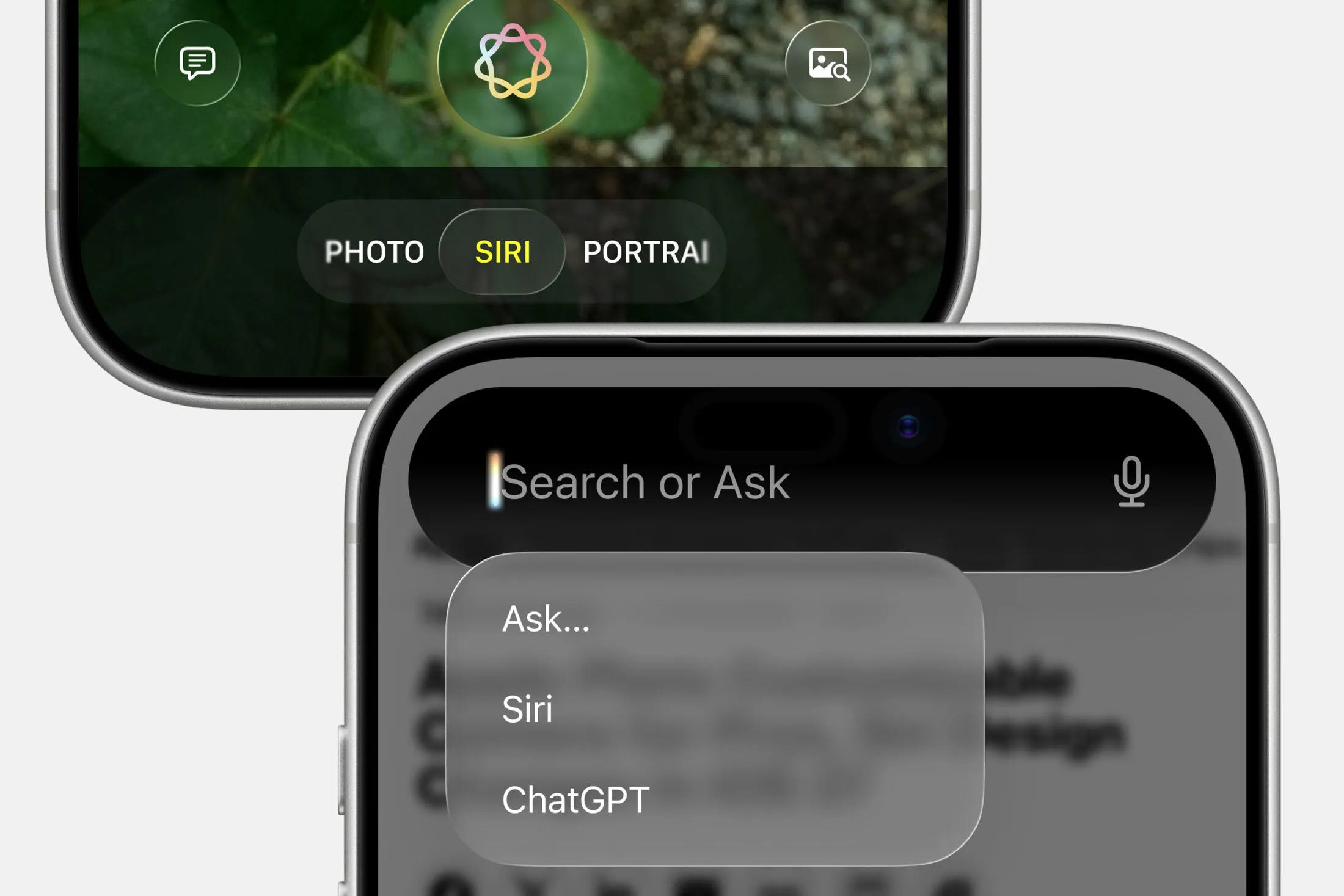
Apple WWDC is June 8 — New Siri Preview? It's coming: the long-awaited Siri overhaul, and the big question on everyone's mind is, will Siri finally work? Bloomberg's Mark Gurman just published an early peek at what he thinks we’ll see (he’s usually right), including: Siri becoming a full chatbot-style app, with AI woven into Apple's native apps and the web. This means you should theoretically be able to ask it to send a text, schedule a meeting, find a photo, or summarize your inbox without it answering, "Here's what I found on the web." WWDC is June 8 and I'll be in Cupertino covering it all. We'll see if Apple finally delivers — or if Siri spends another year being the dumbest thing on the smartest phone in the world. [Read the Bloomberg report HERE]
Threads is the new TikTok for the funniest comments online: Threads comments should be its own primetime TV show. (Mom, Threads is another social media site, basically Meta’s answer to Twitter-turned-X.) Find me on it here.
Reading people's comments makes me laugh so hard that I once woke my husband from a dead sleep — he thought we were having an earthquake because my giggle fit was shaking the bed so much. Seriously. I laughed so hard my abs hurt the next day. If you're not on it yet, it's worth a look — even just to scroll and teehee over "Hopital." IYKYK. Share your faves with me!
Stop trolling the scam texts: A great piece this week in the WSJ by Heidi Mitchell broke down why replying to scam texts — even with nonsense — makes it worse. The moment you reply, your number gets flagged as active and sold on the dark web. Same goes for phone calls. What to do instead: Ignore. Block. Report. Or forward the message to 7726 (which spells SPAM). [Full piece HERE]
Walking slower? Check your hearing. A massive new Apple study covered in the WSJ found a direct link between hearing loss and slower walking speeds at every age. If you have an iPhone running iOS 26 and AirPods Pro 2 or 3, you can run a clinical-grade hearing test at home in five minutes. Send this one to your parents. [Full piece HERE]
7-Eleven data breach hit 183,000 people. The ShinyHunters extortion gang stole personal info from 7-Eleven systems in April, per Have I Been Pwned. If you’ve used the 7-Eleven app or rewards program in the past year, [check Have I Been Pwned] to see if your email was caught up in it. Free, takes 10 seconds.
Okay - that’s enough techish-stuff for now. I’m heading to the beach to join those hopeful sunbathers. What are you doing today?